+353 (0)1 4523432



Product Categories
Quick Order
Please note: In the product reference field, enter the EXACT part numbers that is required. If the exact part number is unknown, use the ‘…’ to search and find what you are looking for.
Loading...Quick Order Process:
Manual Input:
- In the product reference field, enter the EXACT part numbers that is required. If the exact part number is unknown, use the ‘…’ to search and find what you are looking for.
- Once the part number has been filled in, enter the quantity needed.
- If more rows are needed, the ‘new row’ button will add another line to this order.
- When you are satisfied with the order, click on the ‘Add to Basket’ and it will bring you to your basket where you will be able to view or amend the items. Then continue to the checkout process.
Paste from Spreadsheet:
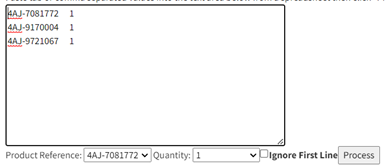
- When copying from a spreadsheet, click on the link called: ‘Click here to paste from a spreadsheet’ and a text box will appear.
- Enter the EXACT part number that is needed, and all additional part numbers must be on a new line.
- To add quantities, the data must be entered as below or a comma can be used to divide the part numbers and quantities:
- Once the data has been successfully transferred over, click on the process button and it will be filled in the product reference and quantity boxes above.
- When you are satisfied with the order, click on the ‘Add to Basket’ and it will bring you to your basket where you will be able to view or amend the items. Then continue to the checkout process.